microsoft/playwright
microsoft/playwright
Activity
Last release
Open issues
Open PRs
License
release notes
release notes
Published 1 week ago
MinorContains breaking changesNew page.screencast API provides a unified interface for capturing page content with:
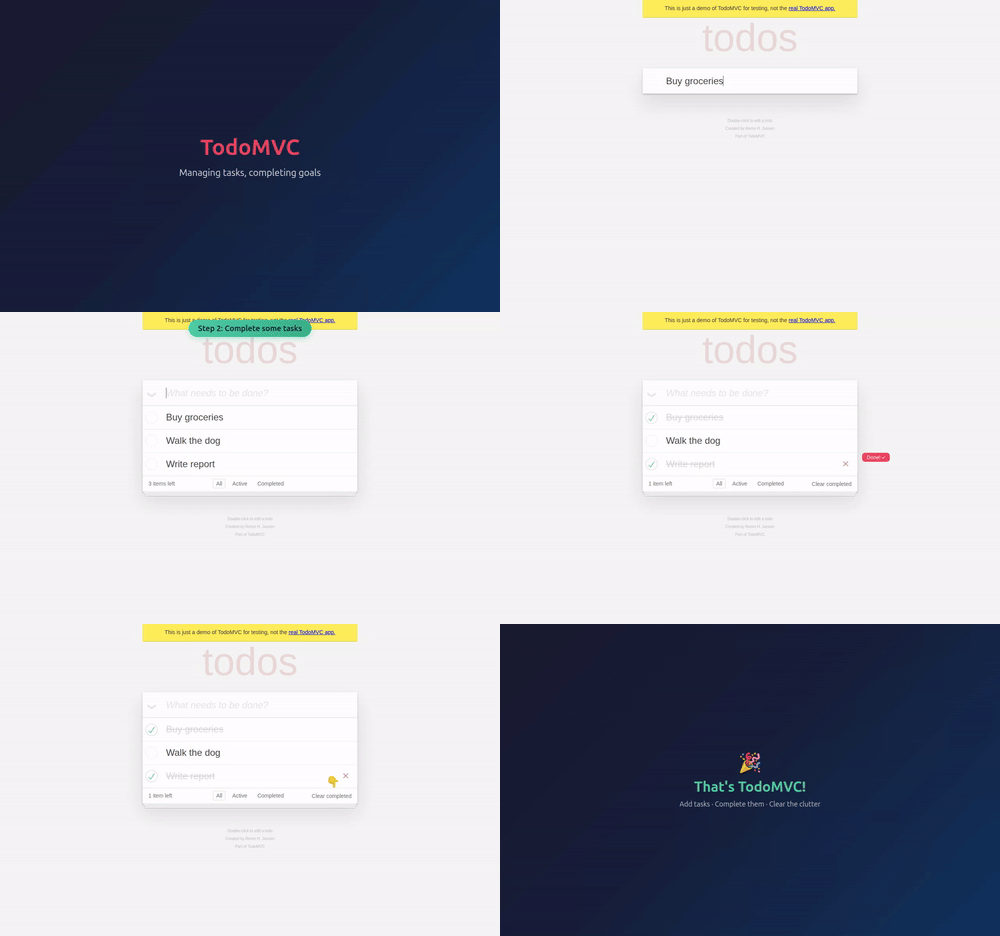
Screencast recording — record video with precise start/stop control, as an alternative to the recordVideo option:
await page.screencast.start({ path: 'video.webm' });
// ... perform actions ...
await page.screencast.stop();
Action annotations — enable built-in visual annotations that highlight interacted elements and display action titles during recording:
await page.screencast.showActions({ position: 'top-right' });
screencast.showActions() accepts position ('top-left', 'top', 'top-right', 'bottom-left', 'bottom', 'bottom-right'), duration (ms per annotation), and fontSize (px). Returns a disposable to stop showing actions.
Action annotations can also be enabled in test fixtures via the video option:
// playwright.config.ts
export default defineConfig({
  use: {
    video: {
      mode: 'on',
      show: {
        actions: { position: 'top-left' },
        test: { position: 'top-right' },
      },
    },
  },
});
Visual overlays — add chapter titles and custom HTML overlays on top of the page for richer narration:
await page.screencast.showChapter('Adding TODOs', {
  description: 'Type and press enter for each TODO',
  duration: 1000,
});

await page.screencast.showOverlay('<div style="color: red">Recording</div>');
Real-time frame capture — stream JPEG-encoded frames for custom processing like thumbnails, live previews, AI vision, and more:
await page.screencast.start({
  onFrame: ({ data }) => sendToVisionModel(data),
  size: { width: 800, height: 600 },
});
Agentic video receipts — coding agents can produce video evidence of their work. After completing a task, an agent can record a walkthrough video with rich annotations for human review:
await page.screencast.start({ path: 'receipt.webm' });
await page.screencast.showActions({ position: 'top-right' });

await page.screencast.showChapter('Verifying checkout flow', {
  description: 'Added coupon code support per ticket [#1234](https://github.com/microsoft/playwright/pull/1234)',
});

// Agent performs the verification steps...
await page.locator('#coupon').fill('SAVE20');
await page.locator('#apply-coupon').click();
await expect(page.locator('.discount')).toContainText('20%');

await page.screencast.showChapter('Done', {
  description: 'Coupon applied, discount reflected in total',
});

await page.screencast.stop();
The resulting video serves as a receipt: chapter titles provide context, action annotations highlight each interaction, and the visual walkthrough is faster to review than text logs.
New browser.bind() API makes a launched browser available for playwright-cli, @playwright/mcp, and other clients to connect to.
Bind a browser — start a browser and bind it so others can connect:
const { endpoint } = await browser.bind('my-session', {
  workspaceDir: '/my/project',
});
Connect from playwright-cli — connect to the running browser from your favorite coding agent.
playwright-cli attach my-session
playwright-cli -s my-session snapshot
Connect from @playwright/mcp — or point your MCP server to the running browser.
@playwright/mcp --endpoint=my-session
Connect from a Playwright client — use API to connect to the browser. Multiple clients at a time are supported!
const browser = await chromium.connect(endpoint);
Pass host and port options to bind over WebSocket instead of a named pipe:
const { endpoint } = await browser.bind('my-session', {
  host: 'localhost',
  port: 0,
});
// endpoint is a ws:// URL
Call browser.unbind() to stop accepting new connections.
Run playwright-cli show to open the Dashboard that lists all the bound browsers, their statuses, and allows interacting with them:
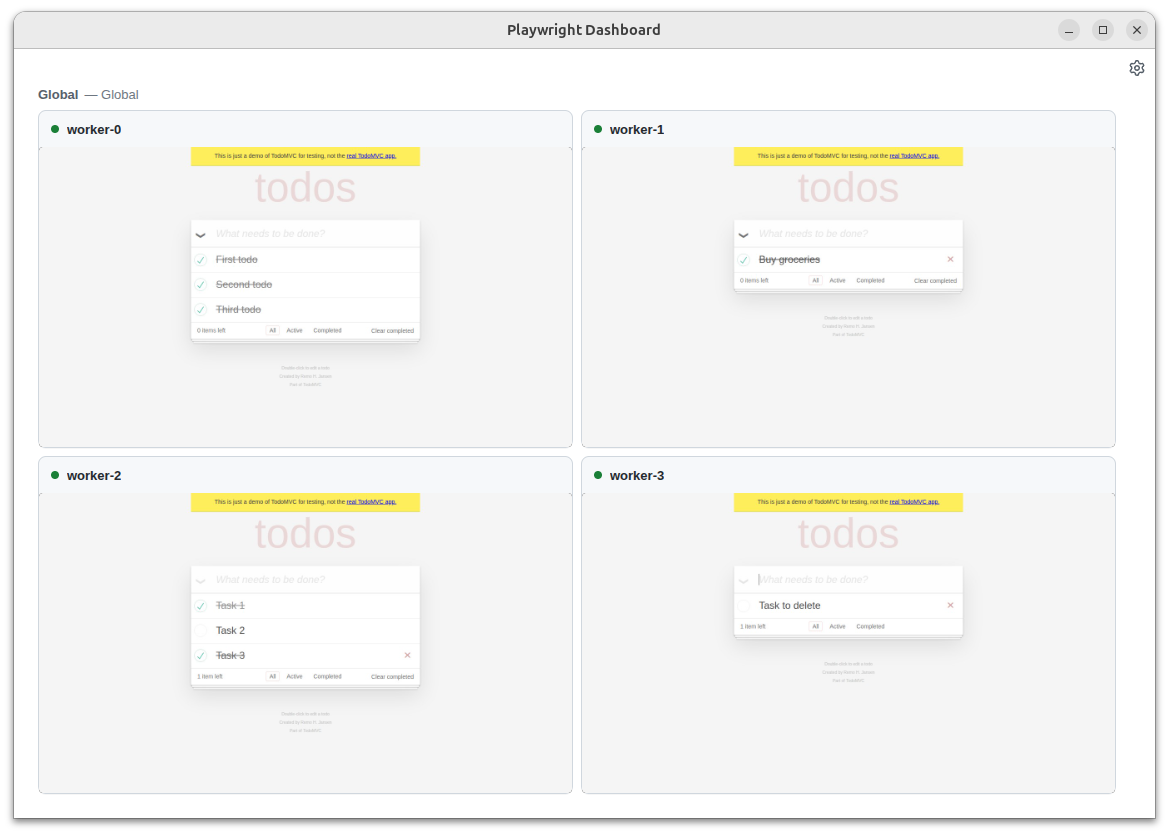
Coding agents can now run npx playwright test --debug=cli to attach and debug tests over playwright-cli — perfect for automatically fixing tests in agentic workflows:
$ npx playwright test --debug=cli
### Debugging Instructions
- Run "playwright-cli attach tw-87b59e" to attach to this test

$ playwright-cli attach tw-87b59e
### Session `tw-87b59e` created, attached to `tw-87b59e`.
Run commands with: playwright-cli --session=tw-87b59e <command>
### Paused
- Navigate to "/" at output/tests/example.spec.ts:4

$ playwright-cli --session tw-87b59e step-over
### Page
- Page URL: https://playwright.dev/
- Page Title: Fast and reliable end-to-end testing for modern web apps | Playwright
### Paused
- Expect "toHaveTitle" at output/tests/example.spec.ts:7
Coding agents can run npx playwright trace to explore Playwright Trace and understand failing or flaky tests from the command line:
$ npx playwright trace open test-results/example-has-title-chromium/trace.zip
  Title:        example.spec.ts:3 › has title

$ npx playwright trace actions --grep="expect"
     # Time       Action                                                  Duration
  ──── ─────────  ─────────────────────────────────────────────────────── ────────
    9. 0:00.859  Expect "toHaveTitle"                                        5.1s  ✗

$ npx playwright trace action 9
  Expect "toHaveTitle"
  Error: expect(page).toHaveTitle(expected) failed
    Expected pattern: /Wrong Title/
    Received string:  "Fast and reliable end-to-end testing for modern web apps | Playwright"
    Timeout: 5000ms
  Snapshots
    available: before, after
    usage:     npx playwright trace snapshot 9 --name <before|after>

$ npx playwright trace snapshot 9 --name after
### Page
- Page Title: Fast and reliable end-to-end testing for modern web apps | Playwright

$ npx playwright trace close
await usingMany APIs now return async disposables, enabling the await using syntax for automatic cleanup:
await using page = await context.newPage();
{
  await using route = await page.route('**/*', route => route.continue());
  await using script = await page.addInitScript('console.log("init script here")');
  await page.goto('https://playwright.dev');
  // do something
}
// route and init script have been removed at this point
page.locator('body').ariaSnapshot().depth and mode in locator.ariaSnapshot().filter in page.consoleMessages() and page.pageErrors() controls which messages are returned.live in tracing.start() for real-time trace updates.artifactsDir in browserType.launch() to configure the artifacts directory.'retain-on-failure-and-retries' records a trace for each test run and retains all traces when an attempt fails — great for comparing a passing trace with a failing one from a flaky test.navigator.platform emulation can cause Ctrl or Meta dispatching errors (https://github.com/microsoft/playwright/issues/40009). Pass PLAYWRIGHT_NO_UA_PLATFORM = '1' environment variable while we are issuing a patch release. Let us know in the issue how it affected you.@playwright/experimental-ct-svelte package.This version was also tested against the following stable channels:
release notes
Published 1 week ago
MinorContains breaking changesNew page.screencast API provides a unified interface for capturing page content with:
Screencast recording — record video with precise start/stop control, as an alternative to the recordVideo option:
await page.screencast.start({ path: 'video.webm' });
// ... perform actions ...
await page.screencast.stop();
Action annotations — enable built-in visual annotations that highlight interacted elements and display action titles during recording:
await page.screencast.showActions({ position: 'top-right' });
screencast.showActions() accepts position ('top-left', 'top', 'top-right', 'bottom-left', 'bottom', 'bottom-right'), duration (ms per annotation), and fontSize (px). Returns a disposable to stop showing actions.
Action annotations can also be enabled in test fixtures via the video option:
// playwright.config.ts
export default defineConfig({
  use: {
    video: {
      mode: 'on',
      show: {
        actions: { position: 'top-left' },
        test: { position: 'top-right' },
      },
    },
  },
});
Visual overlays — add chapter titles and custom HTML overlays on top of the page for richer narration:
await page.screencast.showChapter('Adding TODOs', {
  description: 'Type and press enter for each TODO',
  duration: 1000,
});

await page.screencast.showOverlay('<div style="color: red">Recording</div>');
Real-time frame capture — stream JPEG-encoded frames for custom processing like thumbnails, live previews, AI vision, and more:
await page.screencast.start({
  onFrame: ({ data }) => sendToVisionModel(data),
  size: { width: 800, height: 600 },
});
Agentic video receipts — coding agents can produce video evidence of their work. After completing a task, an agent can record a walkthrough video with rich annotations for human review:
await page.screencast.start({ path: 'receipt.webm' });
await page.screencast.showActions({ position: 'top-right' });

await page.screencast.showChapter('Verifying checkout flow', {
  description: 'Added coupon code support per ticket [#1234](https://github.com/microsoft/playwright/pull/1234)',
});

// Agent performs the verification steps...
await page.locator('#coupon').fill('SAVE20');
await page.locator('#apply-coupon').click();
await expect(page.locator('.discount')).toContainText('20%');

await page.screencast.showChapter('Done', {
  description: 'Coupon applied, discount reflected in total',
});

await page.screencast.stop();
The resulting video serves as a receipt: chapter titles provide context, action annotations highlight each interaction, and the visual walkthrough is faster to review than text logs.
New browser.bind() API makes a launched browser available for playwright-cli, @playwright/mcp, and other clients to connect to.
Bind a browser — start a browser and bind it so others can connect:
const { endpoint } = await browser.bind('my-session', {
  workspaceDir: '/my/project',
});
Connect from playwright-cli — connect to the running browser from your favorite coding agent.
playwright-cli attach my-session
playwright-cli -s my-session snapshot
Connect from @playwright/mcp — or point your MCP server to the running browser.
@playwright/mcp --endpoint=my-session
Connect from a Playwright client — use API to connect to the browser. Multiple clients at a time are supported!
const browser = await chromium.connect(endpoint);
Pass host and port options to bind over WebSocket instead of a named pipe:
const { endpoint } = await browser.bind('my-session', {
  host: 'localhost',
  port: 0,
});
// endpoint is a ws:// URL
Call browser.unbind() to stop accepting new connections.
Run playwright-cli show to open the Dashboard that lists all the bound browsers, their statuses, and allows interacting with them:
Coding agents can now run npx playwright test --debug=cli to attach and debug tests over playwright-cli — perfect for automatically fixing tests in agentic workflows:
$ npx playwright test --debug=cli
### Debugging Instructions
- Run "playwright-cli attach tw-87b59e" to attach to this test

$ playwright-cli attach tw-87b59e
### Session `tw-87b59e` created, attached to `tw-87b59e`.
Run commands with: playwright-cli --session=tw-87b59e <command>
### Paused
- Navigate to "/" at output/tests/example.spec.ts:4

$ playwright-cli --session tw-87b59e step-over
### Page
- Page URL: https://playwright.dev/
- Page Title: Fast and reliable end-to-end testing for modern web apps | Playwright
### Paused
- Expect "toHaveTitle" at output/tests/example.spec.ts:7
Coding agents can run npx playwright trace to explore Playwright Trace and understand failing or flaky tests from the command line:
$ npx playwright trace open test-results/example-has-title-chromium/trace.zip
  Title:        example.spec.ts:3 › has title

$ npx playwright trace actions --grep="expect"
     # Time       Action                                                  Duration
  ──── ─────────  ─────────────────────────────────────────────────────── ────────
    9. 0:00.859  Expect "toHaveTitle"                                        5.1s  ✗

$ npx playwright trace action 9
  Expect "toHaveTitle"
  Error: expect(page).toHaveTitle(expected) failed
    Expected pattern: /Wrong Title/
    Received string:  "Fast and reliable end-to-end testing for modern web apps | Playwright"
    Timeout: 5000ms
  Snapshots
    available: before, after
    usage:     npx playwright trace snapshot 9 --name <before|after>

$ npx playwright trace snapshot 9 --name after
### Page
- Page Title: Fast and reliable end-to-end testing for modern web apps | Playwright

$ npx playwright trace close
await usingMany APIs now return async disposables, enabling the await using syntax for automatic cleanup:
await using page = await context.newPage();
{
  await using route = await page.route('**/*', route => route.continue());
  await using script = await page.addInitScript('console.log("init script here")');
  await page.goto('https://playwright.dev');
  // do something
}
// route and init script have been removed at this point
page.locator('body').ariaSnapshot().depth and mode in locator.ariaSnapshot().filter in page.consoleMessages() and page.pageErrors() controls which messages are returned.live in tracing.start() for real-time trace updates.artifactsDir in browserType.launch() to configure the artifacts directory.'retain-on-failure-and-retries' records a trace for each test run and retains all traces when an attempt fails — great for comparing a passing trace with a failing one from a flaky test.navigator.platform emulation can cause Ctrl or Meta dispatching errors (https://github.com/microsoft/playwright/issues/40009). Pass PLAYWRIGHT_NO_UA_PLATFORM = '1' environment variable while we are issuing a patch release. Let us know in the issue how it affected you.@playwright/experimental-ct-svelte package.This version was also tested against the following stable channels:
Playwright is a framework for Web Testing and Automation. It allows testing Chromium, Firefox and WebKit with a single API.